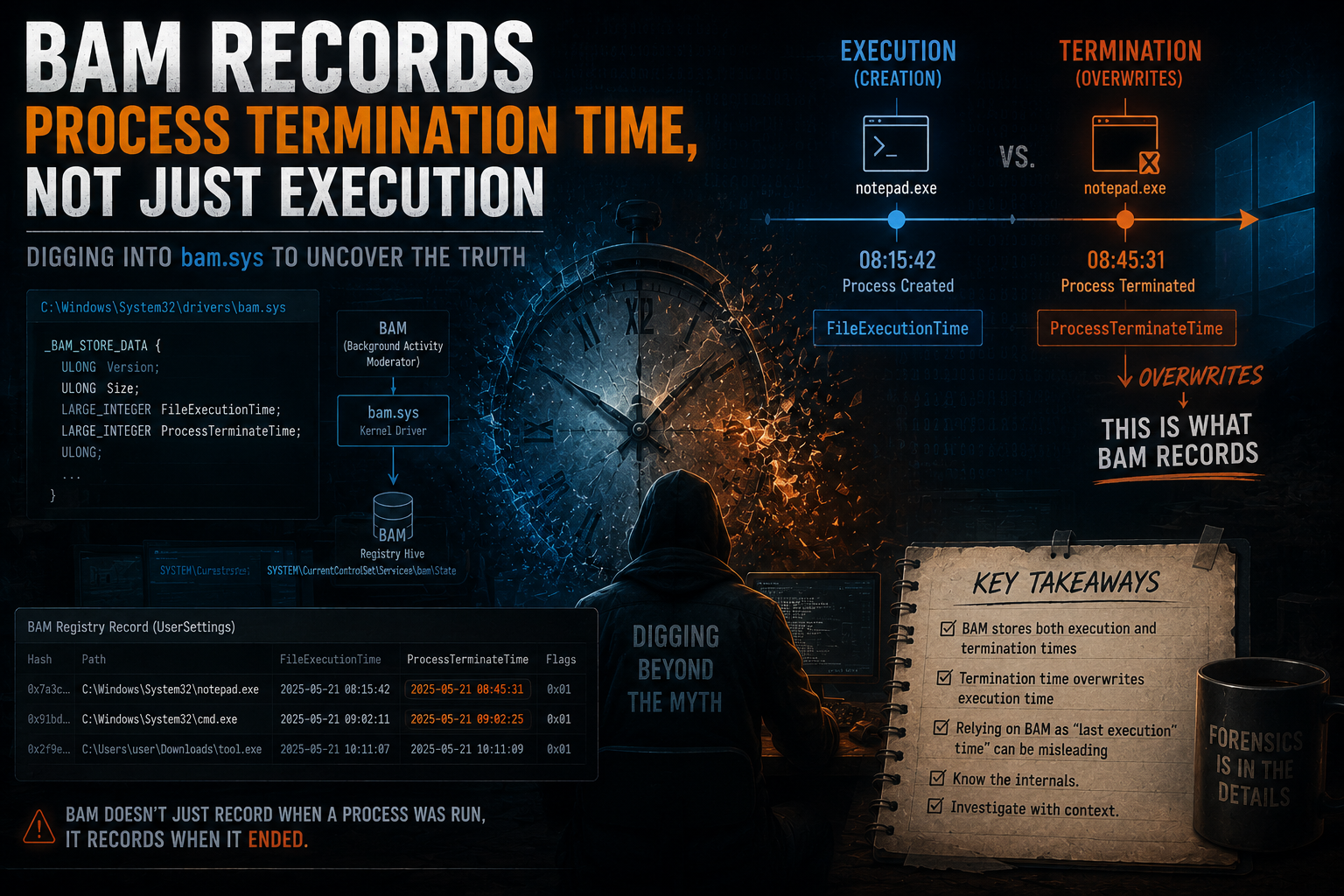
BAM Records Process Termination Time, Not Just Execution
"When did this process stop running?" If you've done DFIR on Windows, you've asked this. The usual answers are Security Event ID 4689 and Sysmon Event ID 5. But most systems don't have the right audit policy enabled, and Sysmon is rarely pre-deployed on compromised machines.
This post shows that the Background Activity Moderator (BAM), a Windows kernel driver present since Windows 10 version 1709, records process termination timestamps. Not "last execution time" as most DFIR guides call it. BAM overwrites its FILETIME on process exit, so for any process that has terminated, the stored value is when it ended.
Key finding: BAM's kernel callback fires on both process creation and termination, overwriting the same FILETIME each time. The final stored value for a terminated process is the termination timestamp.
Credit: The kernel-level analysis in this post builds heavily on Maxim Suhanov's "BAM internals" research (2020), which first documented the internal workings of bam.sys through reverse engineering. Additional kernel extension mechanism insights from Yarden Shafir's research, and practical testing methodology from Psmths' windows-forensic-artifacts.
Say a malicious installer ran on a compromised box. You need to know when it stopped running. What can you check?
| Artifact | Records Termination? | Availability |
|---|---|---|
| Security Event ID 4689 | Yes, exact time | Requires "Audit Process Termination" policy enabled, rarely configured by default |
| Sysmon Event ID 5 | Yes, exact time | Requires Sysmon deployment, not present on most systems |
| Prefetch | No | Records last run time (process start), not termination |
| SRUM AppTimeline | EndTime field, but rounded to the minute | Available on Windows 10+, but imprecise |
| Amcache | No | Records execution metadata, not lifecycle events |
| BAM | Yes, exact time | Available by default on Windows 10 1709+ |
On most systems, 4689 is off and Sysmon was never installed. SRUM has an EndTime field, but it's rounded to the nearest minute. BAM fills the gap: enabled by default, and stores timestamps with FILETIME precision (100-nanosecond intervals).
Search for "BAM forensics" and every guide says the same thing: BAM records the "last execution time" of a program. Here's how popular resources describe it:
- "Provides full path of the executed program and last execution date/time"
- "Last execution time of the program"
- "64-bit Windows FILETIME timestamp showing when the program was last executed"
The phrase "last execution time" makes people think the timestamp is written when the program starts. If that were true, BAM timestamps should match Prefetch run times. They don't. The BAM timestamp consistently shows up after the Prefetch-recorded start time.
Because of the "last execution time" label, most analysts treat BAM as redundant with Prefetch. It's not. Prefetch = start time, BAM = termination time. They cover different ends of the process lifecycle.
The foundational reverse engineering of bam.sys was done by Maxim Suhanov in his 2020 blog post "BAM internals". His analysis revealed that unlike standard process monitoring drivers, BAM does not use PsSetCreateProcessNotifyRoutine(). Instead, it uses the undocumented ExRegisterExtension() API to register its callback via an extension table.
The Callback Registration
The bam.sys driver stores its callback function BampCreateProcessCallback in a function table called BampKernelCalloutTable. This table is passed to ExRegisterExtension() with the magic constant 0x0E0005, which is also found in the kernel's PspInitializeBackgroundActivityModeratorCallouts function.
bam.sys DriverEntry
└─► ExRegisterExtension()
      ├─ Magic: 0x0E0005
      ├─ Table: BampKernelCalloutTable
      └─ Callback: BampCreateProcessCallback
            ├─ Fires on process CREATION  → writes FILETIME
            └─ Fires on process TERMINATION → overwrites FILETIME
The Dual-Fire Behavior
The key part: BampCreateProcessCallback handles both process creation and termination. The name says "Create" but the kernel invokes it on exit too.
Every time it fires, the callback writes a FILETIME to the registry value for that executable under:
HKLM\SYSTEM\CurrentControlSet\Services\bam\State\UserSettings\<SID>\
└─ \Device\HarddiskVolume3\path\to\executable.exe
     └─ Value: [FILETIME (8 bytes)] [flags (16 bytes)]
Since it overwrites the same value each time, once a process exits, what's left in the registry is the termination timestamp.
Why the Name Is Misleading
The function is named BampCreateProcessCallback because it's registered through the process-creation callback infrastructure. But the kernel's extension mechanism routes both creation and termination events through the same function. The name is about how it's registered, not when it fires.
You can verify this yourself by watching the BAM registry value before and after running a process.
Test Setup
| Component | Details |
|---|---|
| OS | Windows 10 Pro, Version 10.0.19041 Build 19041 |
| Tool | Registry Explorer / RECmd (Eric Zimmerman) |
| Test binary | Any GUI application (e.g., notepad.exe, calc.exe) |
| Observation | Monitor BAM registry key in real-time or via before/after hive snapshots |
Test Procedure
Step 1: Open Registry Explorer and navigate to:HKLM\SYSTEM\CurrentControlSet\Services\bam\State\UserSettings\<Your SID>
Step 2: Launch a test application (e.g., notepad.exe). Note the time you launched it.
Step 3: Refresh the registry view. A new BAM entry appears for notepad.exe. The FILETIME timestamp corresponds to the process creation time.
Step 4: Wait a noticeable amount of time (e.g., 2-3 minutes), then close the application.
Step 5: Refresh the registry view. The first 8 bytes of the BAM value have changed. The new FILETIME corresponds to the process termination time, not the original creation time.
If BAM only recorded "execution time" (start), the value wouldn't change after you close the application. It does change. That's the proof.
What You Should See
After Step 3, decode the first 8 bytes of the BAM value as a FILETIME. It should match (within a second) the time you launched the app. After Step 5, decode again. The FILETIME now matches when you closed the app, not when you opened it. The difference between the two timestamps equals roughly how long you kept the application running.
Try it yourself. The result is unambiguous.
During an investigation, we needed to find when a suspicious executable stopped running on a compromised Windows box. Here's what each artifact gave us:
Artifact Comparison
| Artifact | Result | Useful? |
|---|---|---|
| Prefetch (PECmd) | Two run times found | Start times only, not termination |
| Security Event ID 4689 | Not available | Audit policy not configured |
| Sysmon Event ID 5 | Not available | Sysmon not deployed |
| SRUM AppTimeline EndTime | Rounded to nearest minute | Imprecise - could not pinpoint exact second |
| Amcache | No termination data | Execution metadata only |
| ActivitiesCache | EndTime = 0 | Not recorded |
| BAM | Exact timestamp with FILETIME precision | Confirmed as process termination time |
The Investigation Flow
Started with Prefetch (PECmd). Got execution times, but those are start times only.
Checked Security Event Log for 4689 (Process Termination). Zero hits. Audit policy was never turned on.
Parsed SRUM with SrumECmd. The AppTimeline EndTime values looked promising, but digging into the raw ESE database showed they're rounded to the nearest minute by design. Not good enough when you need the exact second.
Finally, pulled BAM from the SYSTEM hive with RECmd. The FILETIME for the executable came in after both Prefetch start times and all child process activity visible in UsnJrnl. That's termination, not start.
RECmd.exe -f "path\to\SYSTEM" --kn "ControlSet001\Services\bam\State\UserSettings" --nlValue Name: \Device\HarddiskVolume3\path\to\suspicious.exe
Value Data: DA-85-D7-74-DB-E2-DB-01-00-00-00-00-00-00-00-00-00-00-00-00-02-00-00-00
First 8 bytes (FILETIME): DA-85-D7-74-DB-E2-DB-01
Decoded: 2025-06-21 18:36:52 UTC ← Process termination timeCross-Validation with UsnJrnl
UsnJrnl ($J) gave some supporting context, but with a caveat: UsnJrnl doesn't record which process caused a file change. It only logs the file operation itself (create, modify, delete) and the timestamp. So you can't directly say "this entry was from our target process."
What you can do is look at the pattern. In this case, the last file activity we could tie to the malware's execution chain stopped about 30 seconds before the BAM timestamp. No more related activity after that. It's circumstantial, not definitive, but it's consistent with BAM recording termination rather than start.
When to Use BAM for Termination Time
Check BAM for process termination time when:
- Security Event ID 4689 is unavailable (audit policy not configured)
- Sysmon Event ID 5 is unavailable (Sysmon not deployed)
- SRUM EndTime precision (rounded to minute) is insufficient
- The system is Windows 10 version 1709 or later
Where to Find BAM Data
Live system:
  HKLM\SYSTEM\CurrentControlSet\Services\bam\State\UserSettings\<SID>

Offline analysis:
  SYSTEM hive → ControlSet001\Services\bam\State\UserSettings\<SID>

DAM (Desktop Activity Moderator) - same structure:
  SYSTEM hive → ControlSet001\Services\dam\State\UserSettings\<SID>
How to Parse BAM Timestamps
Each BAM entry is a registry value where the value name is the full device path of the executable and the value data is a 24-byte binary structure:
Offset  Size   Field
0x00    8      FILETIME - process termination timestamp (for exited processes)
0x08    8      Reserved (typically zeros)
0x10    4      Reserved
0x14    4      Flags (typically 0x00000002)
Tools for parsing:
| Tool | Command |
|---|---|
| RECmd | RECmd.exe -f SYSTEM --kn "ControlSet001\Services\bam\State\UserSettings" --nl |
| Registry Explorer | Navigate to the key, decode FILETIME from the first 8 bytes of each value |
| Python | datetime.datetime(1601,1,1) + datetime.timedelta(microseconds=filetime//10) |
| dcode.fr | dcode.fr/timestamp-converter - paste the decimal FILETIME value, select Windows FILETIME format |
How BAM Complements Other Artifacts
| Question | Best Artifact |
|---|---|
| When did the process start? | Prefetch (last run times from PECmd) |
| When did the process terminate? | BAM (FILETIME from registry) |
| How long did the process run? | BAM timestamp − Prefetch last run time |
| What files did the process access? | Prefetch (file references list) |
| How much resource did the process use? | SRUM (AppResourceUseInfo) |
BAM has real limitations. Know them before you rely on it.
| Limitation | Impact |
|---|---|
| 7-day expiry | BAM entries older than 7 days are deleted on system reboot. If the system rebooted after the incident, entries may be gone. |
| Console applications | Programs launched via command-line interface may not generate BAM entries. |
| Still-running processes | If the process was still running when the image was captured, the BAM timestamp reflects process creation time (the termination overwrite hasn't occurred yet). |
| Deleted executables | If the executable is deleted from disk, the BAM entry is removed on the next reboot. |
| Removable media / network shares | Executables on removable media or network shares may not generate BAM entries. |
| Windows version | BAM was introduced in Windows 10 version 1709 (Fall Creators Update). Not available on older systems. |
Every DFIR guide calls BAM's timestamp "last execution time." That label is wrong, or at best, incomplete. Here's what we know from the kernel analysis and testing:
BampCreateProcessCallbackfires on both process creation and termination- The FILETIME is overwritten on each event, so the final value reflects the last event
- For terminated processes, this means the stored timestamp is the termination time
- BAM is available by default on Windows 10 1709+, unlike Event ID 4689 or Sysmon
If your system doesn't have 4689 or Sysmon (most don't), BAM is probably your best bet for process termination time. Stop treating it as a duplicate of Prefetch. Prefetch tells you when it started. BAM tells you when it ended.
- BAM internals - Maxim Suhanov (dfir.ru) - The foundational reverse engineering of bam.sys that documented BampCreateProcessCallback, BampKernelCalloutTable, and the ExRegisterExtension mechanism. Much of the kernel-level analysis in this post builds on Suhanov's work.
- windows-forensic-artifacts - Psmths - Testing confirming FILETIME written on both creation and termination
- The Kernel Extension Mechanism - Yarden Shafir - Analysis of ExRegisterExtension and BampKernelCalloutTable
- BAM/DAM - artefacts.help - Registry artifact documentation
- BamExtensionTableHook - Dor00tkit - PoC driver demonstrating BAM extension table hooking